As projects grow, Docker Compose quickly becomes insufficient for production-grade workloads. Managing replicas, ensuring high availability, handling node failures, and dynamically scheduling containers all become challenging as the environment expands.
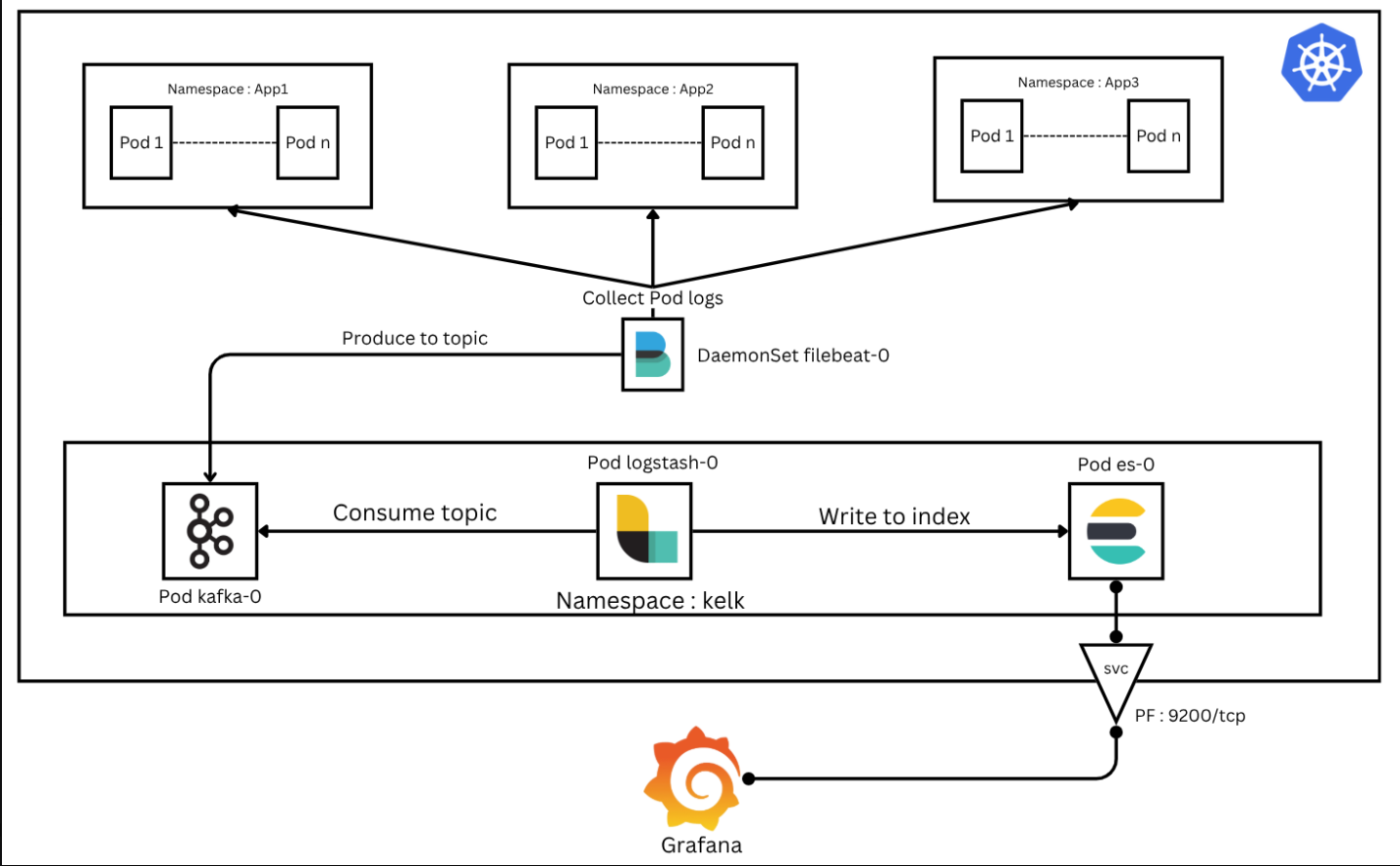
This led me to take the next logical step: migrating the entire architecture to Kubernetes (K8s), a powerful container orchestration platform that automates deployment, scaling, and management of containerized applications. Our goal is to deploy a robust log ingestion pipeline inside Kubernetes and integrate various log sources — whether they are network logs, application logs, or logs from monolithic or microservice applications.
What We'll Cover
In this comprehensive guide, I'll walk you through:
- Deploying KELK (Kafka, Elasticsearch, Logstash, Kibana) resources on Minikube
- Validating and testing the deployment by ingesting messages into Kafka
- Visualizing logs in Grafana
Prerequisites
Before we begin, make sure you have:
- A running Kubernetes cluster (I use Minikube for this tutorial)
kubectlCLI tool installed- Basic understanding of Kubernetes concepts
Step 1: Create Namespace
Let's start by creating a dedicated namespace for our KELK stack. Namespaces in Kubernetes help isolate resources logically, ensuring that KELK resources do not interfere with other applications running in the cluster.
kubectl create namespace kelkStep 2: Kafka Deployment
In newer versions, Apache Kafka no longer depends on ZooKeeper to manage cluster metadata or handle controller elections. Instead, it introduces a new operating mode called KRaft (Kafka Raft Metadata mode), which allows Kafka to operate independently of ZooKeeper, simplifying the architecture.
2.1 Set Up Kafka Persistent Storage
Kafka stores logs and metadata on disk. A PersistentVolumeClaim (PVC) ensures that Kafka data persists even if the Pod is restarted, avoiding data loss.
apiVersion: v1
kind: PersistentVolumeClaim
metadata:
  name: kafka-pvc
  namespace: kelk
spec:
  accessModes:
    - ReadWriteOnce
  resources:
    requests:
      storage: 5Gi
2.2 Kafka Service
The service is optional for a single-node setup, but it becomes essential in a multi-node cluster for broker-to-broker and client communication.
apiVersion: v1
kind: Service
metadata:
  name: kafka-service
  namespace: kelk
spec:
  selector:
    app: kafka
  ports:
    - name: kafka
      protocol: TCP
      port: 9092
      targetPort: 9092
    - name: controller
      protocol: TCP
      port: 9093
      targetPort: 9093
2.3 Deploy Kafka as a StatefulSet
StatefulSet is ideal for Kafka because it maintains stable network identities and persistent storage.
apiVersion: apps/v1
kind: StatefulSet
metadata:
  name: kafka
  namespace: kelk
spec:
  serviceName: "kafka-service"
  replicas: 1
  selector:
    matchLabels:
      app: kafka
  template:
    metadata:
      labels:
        app: kafka
    spec:
      containers:
        - name: kafka
          image: apache/kafka:latest
          ports:
            - containerPort: 9092
              name: kafka
            - containerPort: 9093
              name: controller
          volumeMounts:
            - name: kafka-storage
              mountPath: /var/lib/kafka/data
          env:
            - name: KAFKA_PROCESS_ROLES
              value: "broker,controller"
            - name: KAFKA_CONTROLLER_LISTENER_NAMES
              value: "CONTROLLER"
            - name: KAFKA_LISTENERS
              value: "PLAINTEXT://:9092,CONTROLLER://:9093"
            - name: KAFKA_CONTROLLER_QUORUM_VOTERS
              value: "[email protected]:9093"
            - name: KAFKA_NODE_ID
              value: "1"
            - name: KAFKA_LISTENER_SECURITY_PROTOCOL_MAP
              value: "PLAINTEXT:PLAINTEXT,CONTROLLER:PLAINTEXT"
            - name: KAFKA_OFFSETS_TOPIC_REPLICATION_FACTOR
              value: "1"
            - name: KAFKA_TRANSACTION_STATE_LOG_REPLICATION_FACTOR
              value: "1"
            - name: KAFKA_ADVERTISED_LISTENERS
              value: "PLAINTEXT://kafka-0.kafka-service.kelk.svc.cluster.local:9092"
            - name: KAFKA_LOG_DIRS
              value: "/var/lib/kafka/data"
            - name: KAFKA_INTER_BROKER_LISTENER_NAME
              value: "PLAINTEXT"
      volumes:
        - name: kafka-storage
          persistentVolumeClaim:
claimName: kafka-pvc--- and apply them with kubectl apply -f <file_name>.yaml
Step 3: Elasticsearch Deployment
Elasticsearch serves as the database where Logstash writes logs ingested from Kafka topics.
3.1 Set Up Elasticsearch Persistent Storage
apiVersion: v1
kind: PersistentVolumeClaim
metadata:
  name: es-pvc
  namespace: kelk
spec:
  accessModes:
    - ReadWriteOnce
  resources:
    requests:
      storage: 5Gi
3.2 Elasticsearch Service
This service is necessary for Grafana (Kibana) or any other client to access Elasticsearch indexes.
apiVersion: v1
kind: Service
metadata:
  name: es-service
  namespace: kelk
spec:
  selector:
    app: es
  ports:
    - name: http
      protocol: TCP
      port: 9200
      targetPort: 9200
    - name: transport
      protocol: TCP
      port: 9300
      targetPort: 9300
3.3 Deploy Elasticsearch as a StatefulSet
apiVersion: apps/v1
kind: StatefulSet
metadata:
  name: es
  namespace: kelk
spec:
  serviceName: "es-service"
  replicas: 1
  selector:
    matchLabels:
      app: es
  template:
    metadata:
      labels:
        app: es
    spec:
      containers:
        - name: es
          image: docker.elastic.co/elasticsearch/elasticsearch:8.10.2
          ports:
            - containerPort: 9200
              name: http
            - containerPort: 9300
              name: transport
          volumeMounts:
            - name: es-storage
              mountPath: /usr/share/elasticsearch/data
          env:
            - name: cluster.name
              value: "kafka-cluster"
            - name: bootstrap.memory_lock
              value: "true"
            - name: network.host
              value: "0.0.0.0"
            - name: discovery.type
              value: "single-node"
            - name: xpack.security.enabled
              value: "false"
            - name: ES_JAVA_OPTS
              value: "-Xms512m -Xmx512m"
      volumes:
        - name: es-storage
          persistentVolumeClaim:
            claimName: es-pvc
Step 4: Logstash Deployment
Logstash is a very powerful tool with the capability to pull and collect data from numerous sources, apply different operations such as filtering or enrichment, and then forward the logs to many outputs. For our use case, we'll create a pipeline configuration to instruct Logstash to read from a specific Kafka topic and output it to Elasticsearch.
4.1 Create Logstash Configuration Files
First, create the pipeline configuration file:
input {
  kafka {
    bootstrap_servers => "kafka-0.kafka-service.kelk.svc.cluster.local:9092"
    topics => ["logs"]
  }
}

output {
  elasticsearch {
    hosts => ["http://es-0.es-service.kelk.svc.cluster.local:9200"]
    index => "logs"
    workers => 1
  }
}
And the Logstash YAML configuration:
http.host: "0.0.0.0"
xpack.monitoring.elasticsearch.hosts: [ "http://es-0.es-service.kelk.svc.cluster.local:9200" ]
4.2 Create ConfigMaps
Create ConfigMaps from these configuration files:
kubectl create configmap logstash-config --from-file=logstash-kafka.conf -n kelk
kubectl create configmap logstash-yaml --from-file=logstash.yml -n kelk
4.3 Set Up Logstash Persistent Storage
apiVersion: v1
kind: PersistentVolumeClaim
metadata:
  name: lgstch-pvc
  namespace: kelk
spec:
  accessModes:
    - ReadWriteOnce
  resources:
    requests:
      storage: 5Gi
4.4 Deploy Logstash as a StatefulSet
apiVersion: apps/v1
kind: StatefulSet
metadata:
  name: logstash-service
  namespace: kelk
spec:
  replicas: 1
  selector:
    matchLabels:
      app: logstash
  template:
    metadata:
      labels:
        app: logstash
    spec:
      containers:
        - name: logstash
          image: docker.elastic.co/logstash/logstash:8.10.2
          volumeMounts:
            - name: logstash-config-volume
              mountPath: /usr/share/logstash/pipeline/logstash.conf
              subPath: logstash-kafka.conf
            - name: logstash-yaml-volume
              mountPath: /usr/share/logstash/config/logstash.yml
              subPath: logstash.yml
      volumes:
        - name: logstash-config-volume
          configMap:
            name: logstash-config
        - name: logstash-yaml-volume
          configMap:
            name: logstash-yaml
Step 5: Deployment Validation
5.1 Check All Resources
kubectl get all -n kelkExpected output:
NAME                     READY   STATUS    RESTARTS      AGE
pod/es-0                 1/1     Running   2 (13h ago)   18h
pod/kafka-0              1/1     Running   2 (13h ago)   20h
pod/logstash-service-0   1/1     Running   1 (13h ago)   16h

NAME                    TYPE        CLUSTER-IP     EXTERNAL-IP   PORT(S)             AGE
service/es-service      ClusterIP   10.107.125.4           9200/TCP,9300/TCP   18h
service/kafka-service   ClusterIP   10.101.25.94           9092/TCP,9093/TCP   21h

NAME                                READY   AGE
statefulset.apps/es                 1/1     18h
statefulset.apps/kafka              1/1     20h
statefulset.apps/logstash-service   1/1     16h
5.2 Validate ConfigMaps and PVCs
kubectl get pvc -n kelkExpected output:
NAME        STATUS   VOLUME                                     CAPACITY   ACCESS MODES   STORAGECLASS   AGE
es-pvc      Bound    pvc-a35c2dba-2236-4128-ad47-9df39596f9a5   5Gi        RWO            standard       18h
kafka-pvc Bound pvc-e85e8b6b-59bc-4d68-bf99-62ef7e8e6ee6 5Gi RWO standard 20hkubectl get configmap -n kelkExpected output:
NAME               DATA   AGE
kube-root-ca.crt   1      21h
logstash-config    1      17h
logstash-yaml      1      16h
Step 6: Testing the Pipeline
6.1 Port Forward Elasticsearch
Before starting to ingest and visualize data, let's port forward the Elasticsearch service. This can be done with a simple command or made permanent by changing the service type to NodePort.
kubectl port-forward pod/es-0 --address 0.0.0.0 9200:9200 -n kelk6.2 Configure Grafana Data Source
In Grafana, make a new data source connection with your host IP address (localhost will work if running locally).

Grafana Elasticsearch data source configuration
6.3 Producing Kafka Messages
First, access the Kafka pod:
kubectl exec -it pod/kafka-0 -n kelk -- /bin/bashNow, use the Kafka console producer to send test messages:
kafka-0:/$ /opt/kafka/bin/kafka-console-producer.sh --topic logs --bootstrap-server localhost:9092
>Hi! This is a test
>
6.4 Visualize in Grafana
Let's check Grafana if the message was ingested correctly. Go to Explore and choose logs:
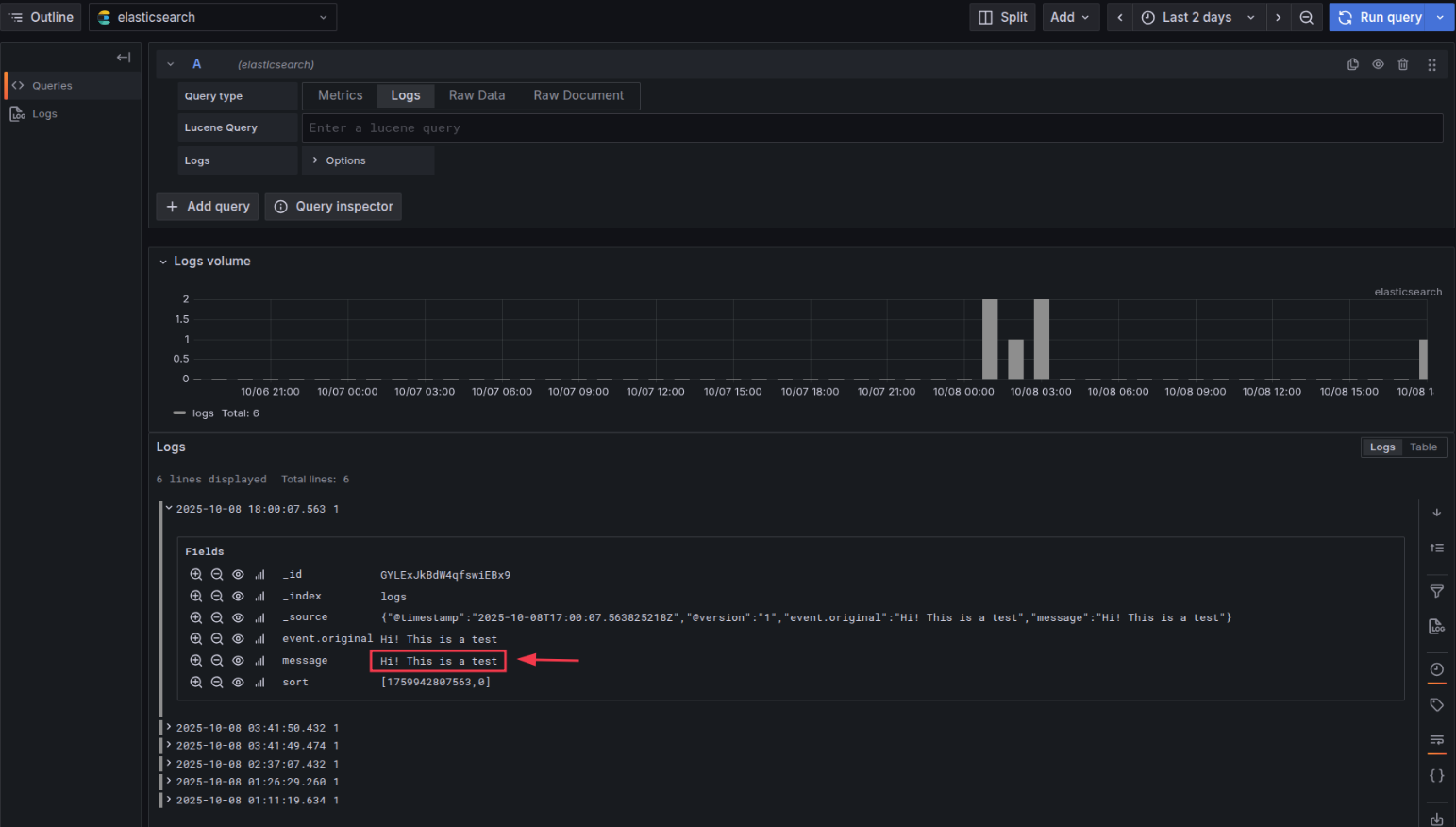
Messages successfully ingested and visualized in Grafana
Key Takeaways
- ✓ Kubernetes provides better scalability compared to Docker Compose
- ✓ StatefulSets ensure stable network identities and persistent storage
- ✓ KRaft mode simplifies Kafka deployment by removing ZooKeeper dependency
- ✓ ConfigMaps make configuration management easier and more maintainable
- ✓ PersistentVolumeClaims ensure data persistence across pod restarts
Troubleshooting Tips
Pod Not Starting
- Check pod logs:
kubectl logs pod/<pod-name> -n kelk - Describe pod for events:
kubectl describe pod/<pod-name> -n kelk - Verify PVC is bound:
kubectl get pvc -n kelk
Logstash Not Consuming from Kafka
- Verify Kafka broker is accessible from Logstash pod
- Check Logstash logs for connection errors
- Ensure the topic name matches in both Kafka and Logstash config
Elasticsearch Connection Failed
- Verify Elasticsearch is running:
kubectl get pods -n kelk - Check if port 9200 is accessible
- Review Elasticsearch logs for errors
Next Steps
Conclusion
Congratulations! You've successfully deployed a production-grade Kafka + ELK logging pipeline on Kubernetes. This setup provides a scalable, resilient foundation for centralized logging that can grow with your application needs.
The architecture we built leverages Kubernetes' orchestration capabilities to ensure high availability, automatic recovery, and easy scaling. With StatefulSets for stateful components and ConfigMaps for configuration management, we have a maintainable and production-ready logging infrastructure.